
SMTP Relay
For frameworks and platforms that can't easily call our REST API, use the SMTP relay. Same DKIM signing, suppression, billing, and webhook delivery — your app just speaks plain SMTP.
Connection
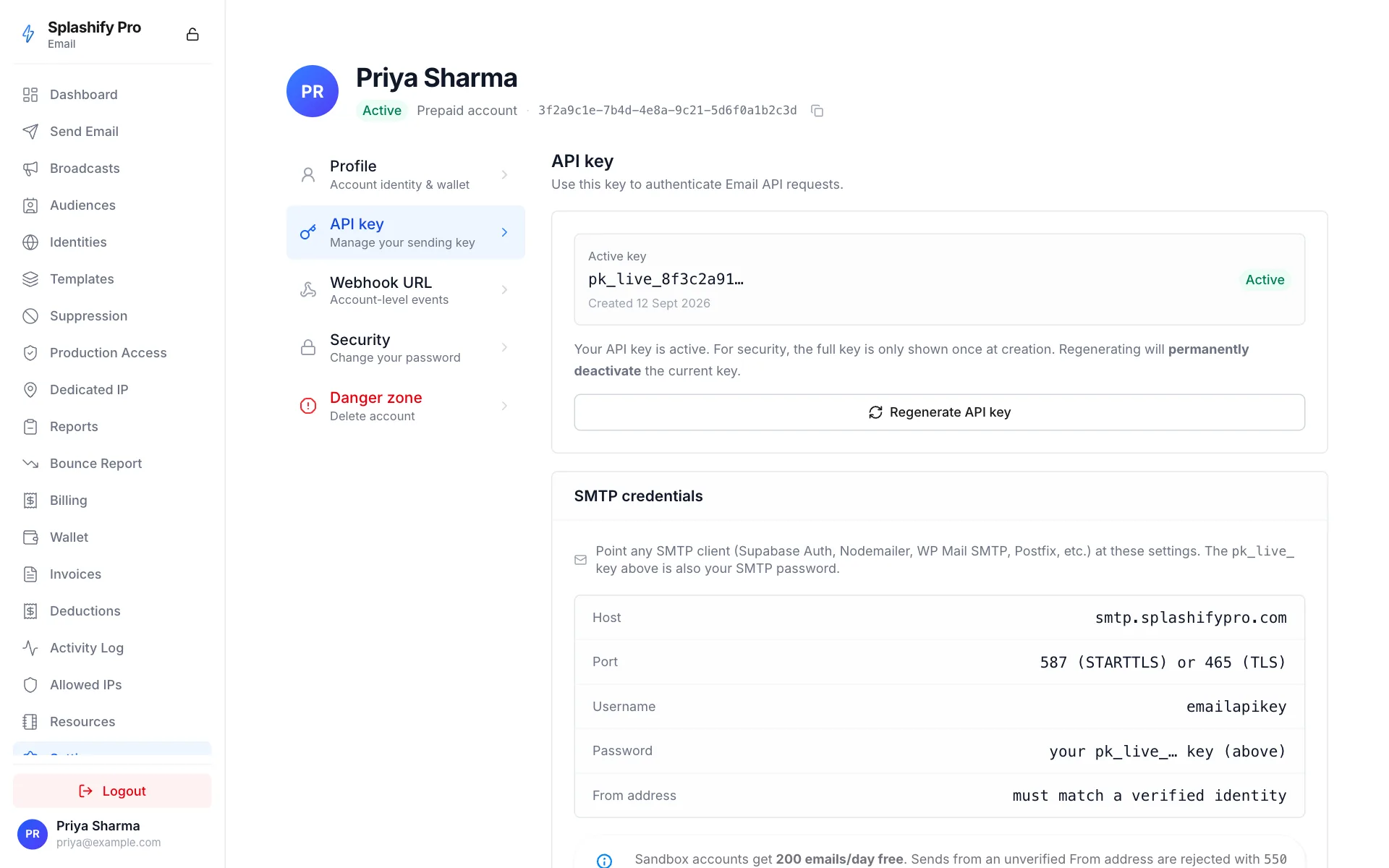
TLS is required. Plain-text auth is rejected.
Test with swaks
swaks --to [email protected] \
      --from [email protected] \
      --server smtp.splashifypro.com \
      --port 587 -tls \
      --auth-user emailapikey \
      --auth-password "$SPLASHIFY_API_KEY" \
      --header "Subject: Test from swaks" \
      --body "Hello"
WordPress (WP Mail SMTP)
- Plugin → WP Mail SMTP → install
- Mailer → Other SMTP
- Host:
smtp.splashifypro.com· Port:587· Encryption:TLS - Auth: ON · Username:
emailapikey· Password: your API key - Save & send a test email
Django
# settings.py
EMAIL_BACKEND = "django.core.mail.backends.smtp.EmailBackend"
EMAIL_HOST = "smtp.splashifypro.com"
EMAIL_PORT = 587
EMAIL_USE_TLS = True
EMAIL_HOST_USER = "emailapikey"
EMAIL_HOST_PASSWORD = os.environ["SPLASHIFY_API_KEY"]
DEFAULT_FROM_EMAIL = "[email protected]"
Laravel
MAIL_MAILER=smtp
MAIL_HOST=smtp.splashifypro.com
MAIL_PORT=587
MAIL_USERNAME=emailapikey
MAIL_PASSWORD=${SPLASHIFY_API_KEY}
MAIL_ENCRYPTION=tls
[email protected]
Node (nodemailer)
import nodemailer from "nodemailer";

const transport = nodemailer.createTransport({
  host: "smtp.splashifypro.com",
  port: 587,
  secure: false,                    // STARTTLS
  auth: {
    user: "emailapikey",
    pass: process.env.SPLASHIFY_API_KEY,
  },
});

await transport.sendMail({
  from: "[email protected]",
  to: "[email protected]",
  subject: "Hello",
  html: "<p>Welcome</p>",
});
Postfix
In /etc/postfix/main.cf:
relayhost = [smtp.splashifypro.com]:587
smtp_sasl_auth_enable = yes
smtp_sasl_password_maps = hash:/etc/postfix/sasl_passwd
smtp_sasl_security_options = noanonymous
smtp_use_tls = yes
smtp_tls_security_level = encrypt
In /etc/postfix/sasl_passwd:
[smtp.splashifypro.com]:587 emailapikey:pk_live_...postmap /etc/postfix/sasl_passwd
chmod 600 /etc/postfix/sasl_passwd*
postfix reloadSupabase Auth (transactional email for signups, OTPs, password reset)
Supabase ships a "Custom SMTP" panel that you can point at the relay so signup confirmation, magic-link, and password-recovery emails come from your verified sender instead of the Supabase default.
Project → Project Settings → Auth → SMTP Settings:
Then save & hit Send test email. If you get
535 5.0.0 5.7.0 invalid api key format it means you pasted something
other than a pk_live_… (or sk_live_… for app-developer accounts)
key — copy the key from Settings → API key
in Splashify Pro Email.
Things to know
- Sender must be on a verified identity. Sends from an unverified
email/domain are rejected with
550 5.7.1 sender '<addr>' is not on a verified identity for this partner. Add the domain or email at Settings → Identities before testing. - Suppression list applies. Recipients on your account
suppression list are rejected at RCPT TO with
550 5.7.1 recipient on suppression list. - Free sandbox: 200 emails/day. New accounts are sandboxed.
Once you exceed the 200/day quota you'll get
452 4.7.0 sandbox daily quota of 200 emails reached. Request production access from the dashboard to lift it. - Billing. ₹0.03/email for paid sends (post-sandbox); sandbox sends are free. SMTP and REST sends bill identically.
- Webhooks fire normally. SMTP and REST sends produce the same event stream into your configured destinations.
- TLS is required. Plain-text AUTH is rejected; the relay only advertises AUTH after STARTTLS (port 587) or on the implicit-TLS port (465).
- Per-message metadata via headers. Set
X-Configuration-Set: <name>on the outbound message to attribute the send to a config set.