
Sending Identities
A sending identity is anything you've proven you control:
- A domain (preferred: covers any address at that domain), or
- A specific email address (limited to that one mailbox)
Every email you send must have a From: address that matches a
verified identity. Sending from an unverified address returns
400 FROM_NOT_VERIFIED.
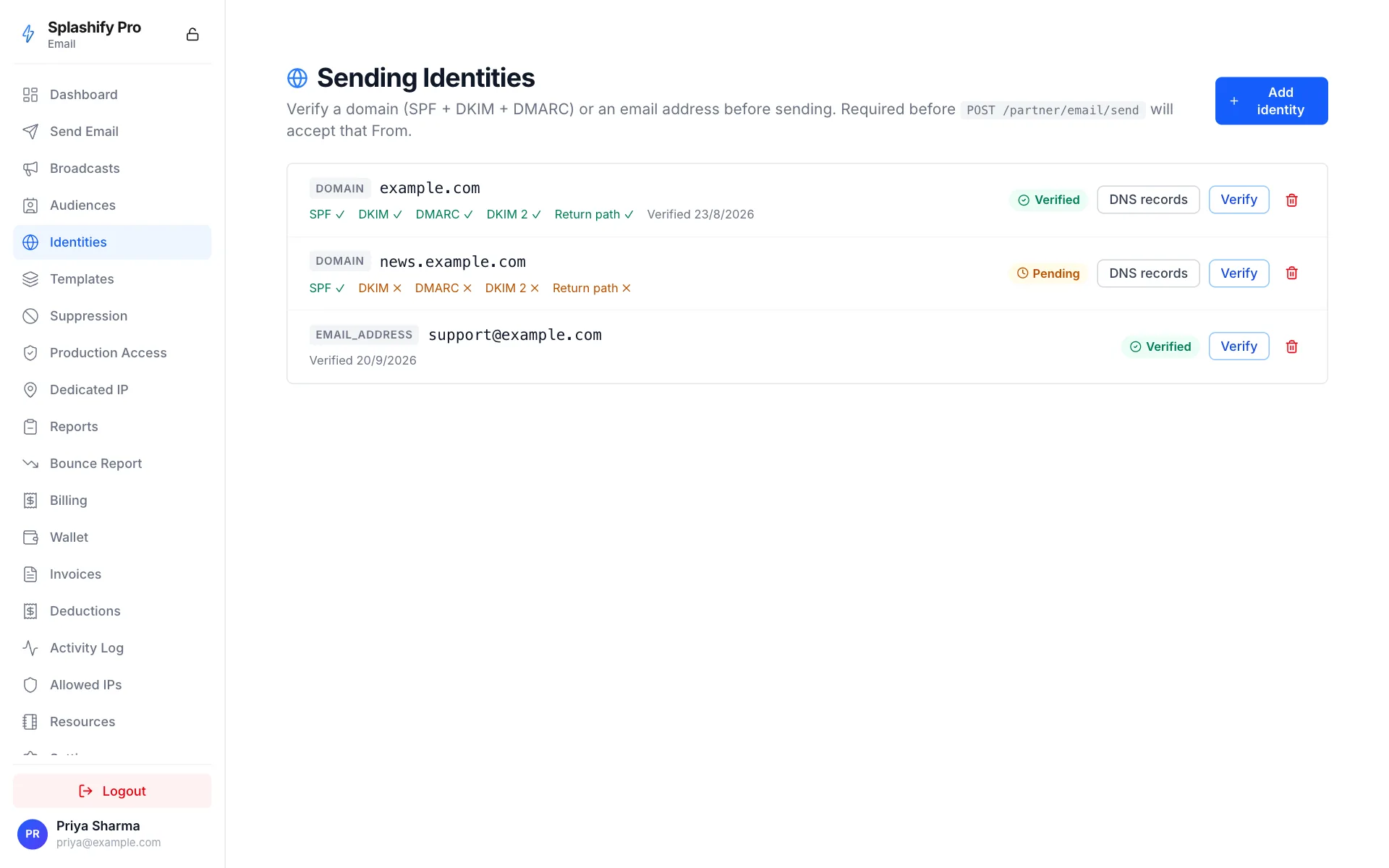
Why verification?
Without verification, anyone could claim to send from
[email protected] through our infrastructure. Verification
proves you control the domain or address at the DNS / mailbox level.
This is the same reason AWS SES, SendGrid, Postmark, Mailgun, and every other ESP requires it. It's not optional in 2026's email landscape.
Domain verification
A domain is verified with DNS records you publish: SPF, DKIM and DMARC,
and for most domains also DKIM 2 and Return path. Once SPF, DKIM and
DMARC are published and checked, you can send from any address at
the domain: hello@, alerts@, noreply@, etc.
Create the identity:
curl https://api.splashifypro.com/api/v1/partner/email/identities \
  -H "Authorization: Bearer $SPLASHIFY_API_KEY" \
  -H "Content-Type: application/json" \
  -d '{"identity_type": "DOMAIN", "identity_value": "yourcompany.com"}'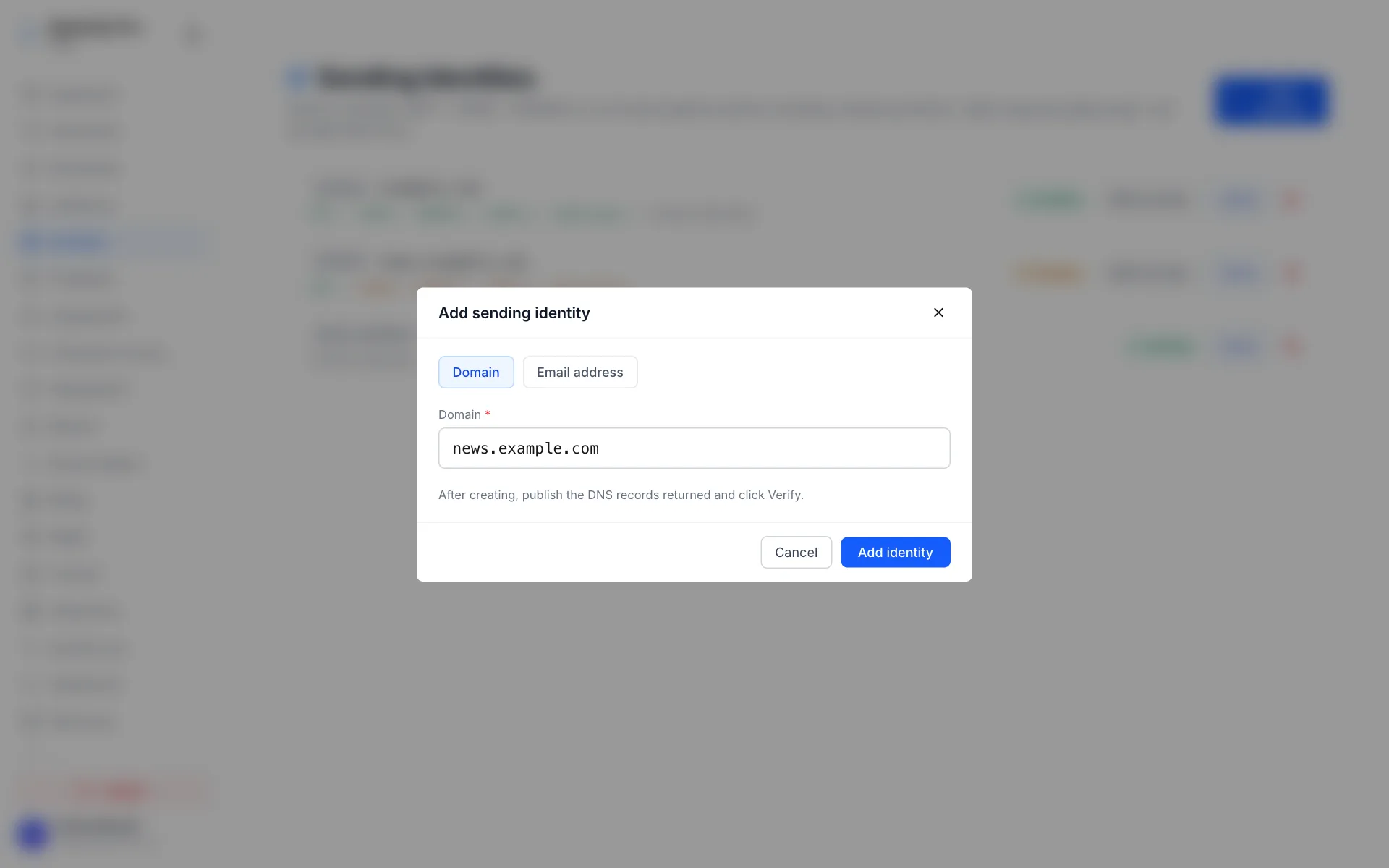
The response lists the records to publish under dns_records:
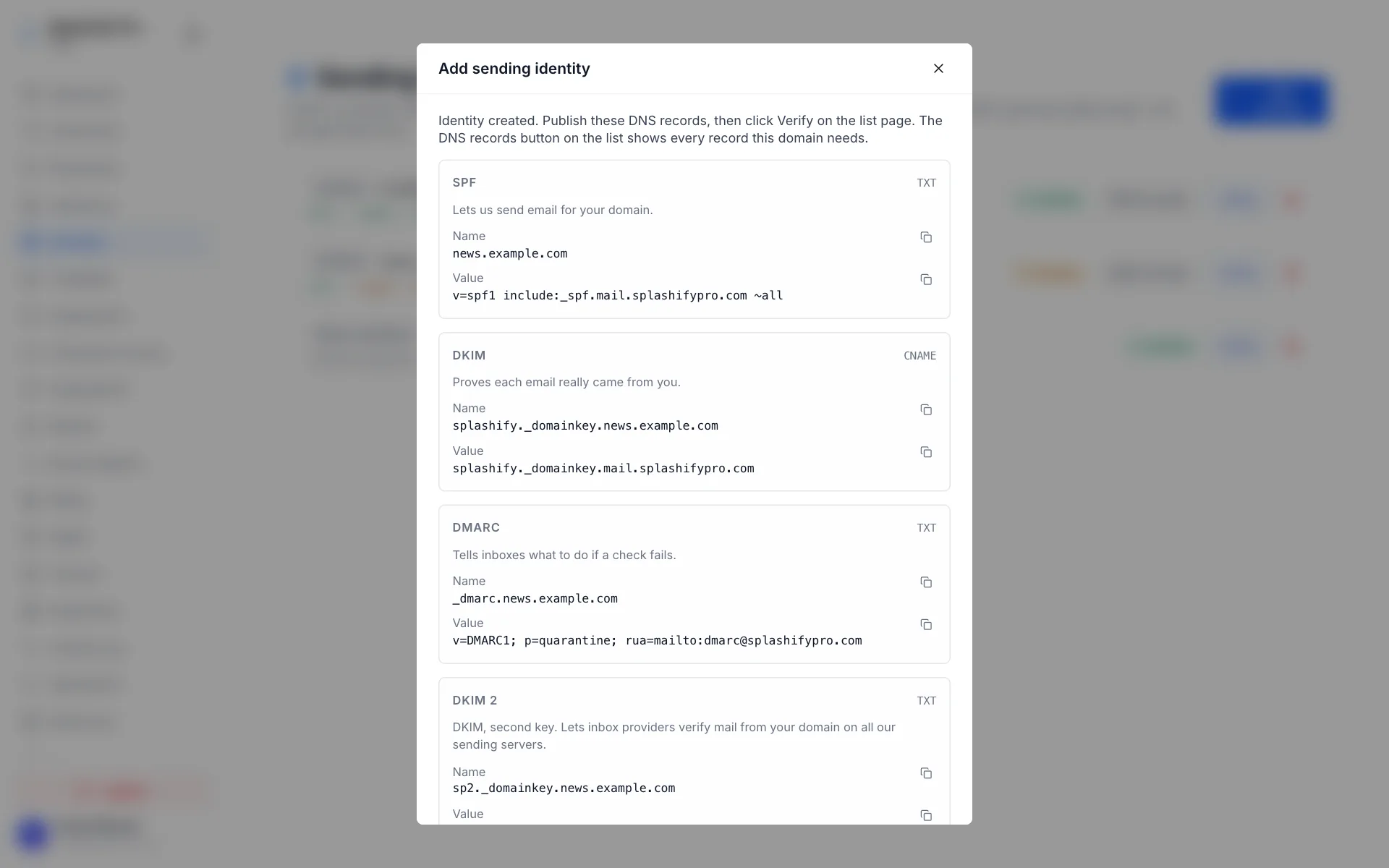
What the last two do:
- DKIM 2 is a second DKIM key. It lets inbox providers verify mail from your domain on all our sending servers.
- Return path lets bounced mail come back to us so your domain keeps a clean sending record.
Add all five. You can send as soon as the first three are verified; add
the other two for the best delivery. The identity status does not wait
for them. If a domain lists only spf, dkim and dmarc, publish those
three.
Each entry of dns_records has the same shape:
{
  "dns_records": {
    "spf": { "type": "TXT", "hostname": "yourcompany.com", "value": "v=spf1 include:_spf.mail.splashifypro.com ~all", "pass": false },
    "dkim": { "type": "CNAME", "hostname": "splashify._domainkey.yourcompany.com", "value": "splashify._domainkey.mail.splashifypro.com", "pass": false },
    "dmarc": { "type": "TXT", "hostname": "_dmarc.yourcompany.com", "value": "v=DMARC1; p=quarantine; rua=mailto:[email protected]", "pass": false },
    "dkim2": { "type": "TXT", "hostname": "...", "value": "...", "pass": false },
    "return_path": { "type": "CNAME", "hostname": "...", "value": "...", "pass": false }
  },
  "dkim2_ok": false,
  "return_path_ok": false
}
When dkim2 and return_path are listed, the identity also carries
dkim2_ok and return_path_ok next to spf_ok, dkim_ok and
dmarc_ok. They can show up a moment after you create the identity: if
the create response lists only three records, read the identity again
with GET /partner/email/identities or open the Sending Identities
page in Splashify Pro Email. Always copy the hostname and value of
dkim2 and return_path from there; they are made for your domain.
After publishing on your DNS provider, trigger a re-check:
curl -X POST https://api.splashifypro.com/api/v1/partner/email/identities/DOMAIN/yourcompany.com/verify \
  -H "Authorization: Bearer $SPLASHIFY_API_KEY"
The same call re-checks all the records. Once "status": "VERIFIED"
lands, you're good. When dkim2_ok or return_path_ok in that response
is still false, that record is pending: add it for the best delivery.
We re-check verified domains every 24 hours; if the SPF, DKIM or DMARC
record disappears, status flips back to PENDING and we email you.
Email-address verification
For low-volume use cases or when you can't add DNS records (you're using a public-domain mailbox like Gmail), verify a single address:
curl https://api.splashifypro.com/api/v1/partner/email/identities \
  -H "Authorization: Bearer $SPLASHIFY_API_KEY" \
  -H "Content-Type: application/json" \
  -d '{"identity_type": "EMAIL_ADDRESS", "identity_value": "[email protected]"}'
We email a verification link to the address. Click it (or use the verify endpoint directly with the included token) and the address becomes verified.
Public-domain caveat
We refuse to verify addresses at common
public providers (gmail.com, yahoo.com, outlook.com, etc.).
Sending bulk through [email protected] violates Google's TOS and
would get our IP blocklisted within hours. Use your own domain.
Display name vs verified address
You can set a friendly display name without verifying it:
{
  "from": "Sarah from Acme <[email protected]>"
}
acme.com must be verified. Sarah from Acme is unverified:
recipients see whatever string you supply.
Multiple domains
Verify as many domains as you like. Common pattern: one for
transactional (mail.acme.com), one for marketing (news.acme.com).
Helps deliverability: bounces / complaints on the marketing domain
don't drag down transactional reputation.
Listing your identities
curl https://api.splashifypro.com/api/v1/partner/email/identities \
  -H "Authorization: Bearer $SPLASHIFY_API_KEY"
Removing an identity
curl -X DELETE https://api.splashifypro.com/api/v1/partner/email/identities/DOMAIN/yourcompany.com \
  -H "Authorization: Bearer $SPLASHIFY_API_KEY"
In-flight sends from that domain complete normally; new sends are
rejected with FROM_NOT_VERIFIED.
Auto-recheck behaviour
Verified domains: re-checked every 24 hours.
Pending domains: re-checked every 1 hour for 7 days, then drop to
FAILED if SPF, DKIM and DMARC still aren't published.
You can always re-trigger via POST /verify.